


Construction Purchase Order Process: A Practical Guide
- DJ Custom Contracting

- 11 minutes ago
- 12 min read

A construction purchase order process is a six-stage financial control cycle. Requisition submission leads to approval, then PO generation, vendor acceptance, goods receipt and inspection, and finally three-way invoice matching and payment. Tools like NetSuite, Procore, and Xpedeon run this workflow digitally, and most vendor payment terms follow a payment schedule tied to an approved PO that is commonly within a standard timeframe.
Requisition to payment: field or procurement staff request materials, a manager approves them, and accounts payable releases funds only after goods arrive and match the invoice.
Net 30 is standard: most construction vendors expect payment within 30 days of a valid invoice tied to an accepted PO.
Software matters: platforms like NetSuite, Procore, Tradogram, Autodesk, and Xpedeon automate approval routing and reduce manual matching errors.
Key Takeaways
A reliable construction purchase order process depends on enforcing all six lifecycle stages, especially three-way matching, before any invoice gets paid.
Point | Details |
Follow the six-stage lifecycle | Requisition, approval, PO generation, vendor acceptance, goods receipt, and three-way matching each need a clear owner. |
Never skip bid leveling | Normalize vendor quotes to the same scope before issuing a PO to catch hidden gaps in low bids. |
Set clear DoA thresholds | Digital approval routing, not email chains, keeps purchases inside authorized dollar limits. |
State FOB terms explicitly | FOB Origin versus FOB Destination determines who bears liability for damaged shipments. |
Djcustomcontracting handles fulfillment | Djcustomcontracting offers direct PO fulfillment and procurement coordination for contractors who need execution support. |
Table of Contents
What a Construction Purchase Order Actually Covers
A construction purchase order is a financial control document, not the deal itself. It locks in a specific price, quantity, and delivery date for materials or equipment tied to a job’s budget and cost codes, so the project manager can track committed cost against what’s actually approved to spend.
It is easy to confuse a PO with the master agreement it sits under. A purchase order is not a contract but a financial instrument within a contract, according to Procore’s guidance for contractors. The contract sets the overall scope, terms, and legal obligations for the job. The PO simply authorizes one specific purchase inside that scope.
PO vs. contract: the contract governs the whole relationship and its risk terms; the PO governs one transaction, one price, one delivery window.
PO vs. invoice: a PO is the buyer’s authorization to purchase; an invoice is the seller’s demand for payment after delivery, and it should never be paid without a matching PO on file.
Document | Purpose | Who issues it |
Contract | Defines scope, terms, and legal obligations | Owner or general contractor |
Purchase order | Authorizes one specific purchase at a fixed price | Procurement or project manager |
Invoice | Requests payment for delivered goods | Vendor or supplier |
Key Elements Every Construction PO Must Include
A PO missing even one field creates room for disputes over price, timing, or liability. Every construction PO should carry these fields at minimum:
PO number, tied to the project’s job number for tracking
Buyer and seller contact and business information
Item descriptions with specs, model numbers, or drawing references
Quantities and units (each, linear foot, pallet, ton)
Unit price and extended total
Jobsite delivery address and required delivery window
FOB or shipping terms, since contractors should state FOB Origin or FOB Destination explicitly to avoid unexpected liability for goods damaged in transit
Agreed lead times for fabrication or shipping
Payment terms, commonly a standard net payment period
Warranty and inspection clauses
Cost code or job number for budget tracking
Reference to the related contract or subcontract number
Pro Tip: Write item descriptions the way a stranger unfamiliar with the job would need them: exact model number, finish, and unit of measure. “10 doors” invites a dispute; “10 solid-core 36-inch doors, primed, per Spec Section 08 14 00” does not.
For fragile materials, custom millwork, or long-lead equipment like elevators or HVAC units, add specific packaging, handling, and storage instructions directly on the PO. A supplier storing a $40,000 chiller outdoors for six weeks because nobody specified indoor storage is a preventable argument.

Standard, Blanket, Planned, and Change Purchase Orders
Not every purchase fits the same PO type, and picking the wrong one creates unnecessary paperwork or, worse, unauthorized spending.
Standard PO: a single, one-time purchase with a fixed quantity and price. Use it for a one-off equipment rental or a specific material buy.
Blanket PO: covers repeated purchases from one vendor over a set period, useful for ongoing supplies like fasteners or safety gear across a job.
Planned/release PO: authorizes a total quantity released in scheduled phases, common for phased concrete pours or staged steel deliveries.
Change/variation PO: amends an existing PO’s price, quantity, or scope after conditions change on site.
PO type | Best use case |
Standard | One-time equipment or material purchase |
Blanket | Recurring supply orders with one vendor |
Planned/release | Phased delivery tied to a schedule milestone |
Change/variation | Scope or price amendment to an existing order |
Labor-heavy work, like framing or electrical rough-in, generally needs a subcontract with insurance and lien waiver terms, not a PO. Reserve POs for materials, equipment, and rentals where the exchange is a defined product for a defined price.
The Six-Stage PO Lifecycle, Step by Step
The construction purchase order process runs on six checkpoints, and skipping any one of them is how projects end up paying for materials nobody approved.
Requisition submission: a site foreman or project engineer identifies a need and submits a request with quantity, specs, and required date.
Requisition approval: a supervisor or project manager reviews the request against the budget and cost code before it moves forward.
PO generation: procurement drafts the PO with vendor terms, pricing, delivery window, and FOB terms, following a standard requisition-to-PO workflow.
Vendor acceptance: the supplier confirms the order, pricing, and delivery date in writing, formally accepting the terms.
Goods receipt and inspection: site staff verify quantity and quality on delivery and log a goods receipt note (GRN).
Three-way invoice matching and payment: accounts payable matches the PO, the GRN, and the invoice before releasing payment, typically under standard net payment terms.
Lead times vary by material, but long-lead items like structural steel or custom windows should be flagged during PO generation, not discovered at delivery.
Hold points belong at requisition approval (budget check) and goods receipt (quality check), since these two gates catch the most costly errors.
Stage | Primary owner |
Requisition submission | Field foreman or site engineer |
Requisition approval | Project manager |
PO generation | Procurement |
Vendor acceptance | Vendor, confirmed by procurement |
Goods receipt/inspection | Site superintendent |
Invoice matching/payment | Accounts payable |
Setting Up Approval Flows and Delegation of Authority
A clear delegation of authority (DoA) keeps small purchases moving fast while protecting the budget from large, unapproved commitments. Without it, either everything bottlenecks at the top, or nothing gets reviewed at all.
Field/site staff: submit requisitions, verify deliveries, flag discrepancies immediately.
Procurement: generates POs, manages vendor terms, and runs bid leveling before issuance.
Project manager: approves requisitions within a set dollar threshold and monitors committed cost against budget.
Commercial/contracting lead: reviews larger POs and change orders tied to contract scope.
Accounts payable: performs three-way matching and releases payment.
Vendor: accepts terms, confirms delivery date, and supplies the invoice.
A typical DoA structure looks like this: a foreman can approve purchases up to $2,000, a project manager up to $25,000, and anything above that routes to a finance director or commercial lead. Digital approval workflows enforce these thresholds automatically. Email or PDF-based routing does not, which is exactly how POs get issued above authority limits without anyone noticing until the invoice lands.
Pro Tip: If your current process relies on forwarding a PDF for a signature, you don’t have an approval flow. You have an honor system, and honor systems don’t scale past three active jobs.
PO, Contract, Invoice, or Payment Application: Which One Do You Need?
Field teams waste time when they reach for the wrong document. A quick reference cuts through the confusion:
Use a contract when defining the overall scope, price, and legal terms for a phase or the whole job.
Use a PO when authorizing one specific purchase of materials or equipment already covered under that contract.
Use an invoice only as the vendor’s formal request for payment after delivery, never as authorization to buy.
Use a payment application when a contractor is requesting a progress draw for completed work, not for a product purchase.
As a rule of thumb: labor and scope changes usually call for a subcontract or change order, while material and equipment purchases call for a PO. Product purchases generally fall under the Uniform Commercial Code, while labor and construction scope fall under general contract law, so the governing rules differ depending on what’s actually being bought, per Projectmates’ comparison of contracts and purchase orders.
Creating and Issuing a Construction PO the Right Way
Issuing a PO is more than filling in a template. Skip a step here and you either delay the job or authorize a purchase nobody actually vetted.
Verify the requisition details match the actual site need and current drawings.
Confirm the vendor is qualified and has current insurance and licensing on file.
Run bid leveling to compare quotes on equal terms before selecting a vendor.
Assign the correct cost code and job number to the PO.
Set delivery date, jobsite address, and FOB terms.
Attach relevant spec sheets, drawings, or submittals.
Route the PO through DoA approval based on dollar value.
Send the PO with clear vendor acceptance instructions, such as a signed confirmation or reply email.
Bid leveling is a mandatory step before finalizing a PO, since it’s the only way to catch a supplier who quoted low by quietly excluding scope, per Projectmates’ guidance on bid leveling. Normalize every quote to the same scope, freight terms, and lead time before comparing prices; a deeper walkthrough of the process appears in Won2Build’s guide to construction bid leveling.
Pro Tip: Document exactly what you added or removed from each vendor’s original quote during leveling. That paper trail is your defense if a supplier later claims the low price didn’t include delivery.
Receiving, Inspecting, and Matching POs on Site
The PO isn’t finished when the truck shows up. It’s finished when the paperwork matches the pallet.
Verify the PO number against the delivery paperwork before unloading anything.
Inspect quantity and quality against the PO’s specs, not just a visual headcount.
Capture a goods receipt note (GRN) with photos and a timestamp as proof of delivery condition.
Document any discrepancy immediately, on the delivery ticket, not from memory later.
Escalate discrepancies above a set dollar value per the project’s DoA structure.
The three-way match, comparing the PO, the GRN, and the invoice, is the control point that catches billing errors before they become cash-flow problems. If quantities, prices, or items don’t align across all three documents, the invoice should be held rather than paid until the mismatch is resolved.
When a discrepancy surfaces, the typical resolution path runs:
Place a temporary hold on the invoice.
File a formal claim or discrepancy notice with the vendor.
Negotiate a credit memo, partial payment, or re-shipment.
Update the PO record once resolved, and note the resolution for future vendor evaluations.
Pro Tip: Photograph everything at delivery, including packaging condition, before the crew moves material off the truck. A time-stamped photo settles more disputes than a phone call ever will.
Choosing Software for Construction PO Management
The right platform ties every PO to a cost code and the schedule automatically, so nobody is reconciling spreadsheets against bank statements at month-end. When evaluating a tool, weigh these factors:
Approval workflow configuration and automatic DoA enforcement
Three-way match automation between PO, GRN, and invoice
Integrations with existing ERP, accounting, and construction management systems
Mobile access and offline functionality for site staff without reliable signal
Inventory and material tracking across multiple active jobs
Reporting on committed cost versus budget in real time
Platform | Best for | PO automation strength |
General contractors managing field and office together | Strong approval routing and mobile receiving | |
Mid-size to large firms needing full ERP integration | Deep accounting and three-way match automation | |
Smaller procurement teams wanting simple PO tracking | Straightforward requisition-to-PO workflow | |
Firms already using Autodesk Construction Cloud for design and field data | Procurement tied directly to project documentation | |
Larger contractors needing end-to-end ERP and procurement | Amendment history and at-risk long-lead tracking |
Moving from manual, email-based procurement to an integrated digital workflow lets every purchase post directly against its cost code for real-time budget visibility, which cuts down on the invoice mismatches that manual systems tend to produce.
Sample PO Template and a Site Receiving Checklist
A usable PO template doesn’t need to be complicated, just complete. Structure it around these labeled fields:
PO number and date issued
Buyer and vendor contact information
Job number and cost code
Item description, quantity, unit, and unit price
Total price and payment terms (e.g., Net 30)
Delivery address, required date, and FOB terms
Warranty terms and inspection requirements
Field | Example entry |
PO number | PO-2026 |
Item | porcelain tile, Model X |
Delivery | Jobsite dock, by March 14 |
Payment terms | Net 30 |
On-site receiving checklist for crews: confirm the PO number on the packing slip, count and inspect against the order, sign and date the GRN, and photograph any damage before the vendor’s driver leaves. For rentals or long-lead items, add expected return dates or fabrication milestones directly to the template so nothing falls through during a multi-week wait.
Best Practices and the Pitfalls That Undermine Them
Most PO failures trace back to a handful of repeatable habits, not bad luck.
Move from spreadsheets to a digital workflow with built-in approval routing.
Link every PO to its cost code and the master schedule, not a standalone log.
Require a valid PO number on every invoice before accounts payable processes it.
Document bid leveling on every purchase above a set threshold.
Prequalify suppliers for insurance, licensing, and delivery reliability before issuing POs.
Track long-lead items on a weekly status report tied to the schedule.
Hold a weekly procurement review meeting to catch stalled approvals.
Formalize a change order process for any PO amendment, rather than a verbal update.
Vague item descriptions, missing FOB terms, and weak DoA enforcement are the three pitfalls that show up most often, and each has a direct fix: specify exact model numbers and units, state FOB terms on every order, and set dollar thresholds that route automatically instead of relying on someone remembering to ask.
Pro Tip: Commit long-lead items during buyout, not after mobilization. Waiting even two weeks on a 12-week lead item can push your finish date without anyone noticing until it’s too late to recover.
Why Bid Leveling and the Six-Stage Lifecycle Protect Your Margin
The six-stage lifecycle, requisition, approval, PO generation, vendor acceptance, goods receipt, and three-way matching, exists because every stage is a place where an unauthorized cost can slip through if nobody’s watching.
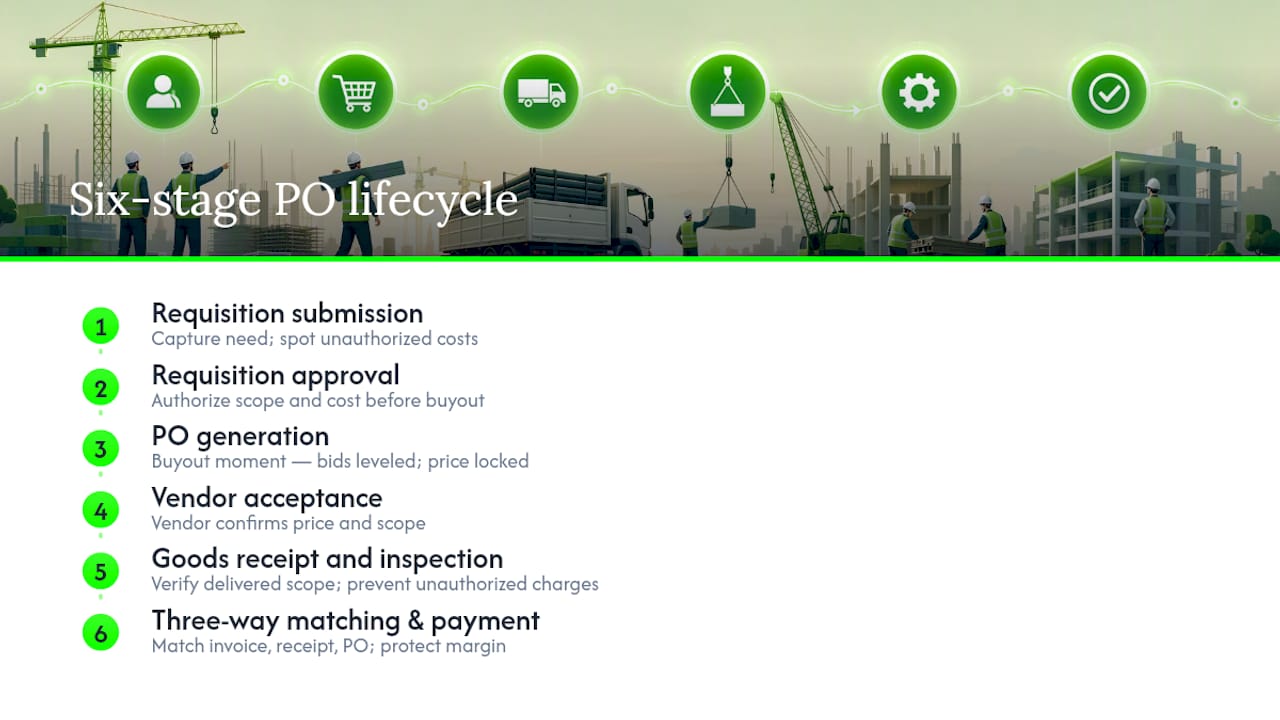
Bid leveling matters most during buyout, the phase right after contract award when subcontract awards and long-lead commitments get locked in. Effective buyout execution can improve project margins by a meaningful margin, and most of that gain or loss traces directly to whether bids were leveled properly before the PO was signed. Margin exposure peaks during buyout and shrinks fast once POs lock in price and scope.
An Operational Lesson From the Field
On one renovation project, holding a long-lead HVAC order for an extra week to finish bid leveling felt like a delay at the time. It caught a supplier who had quietly excluded startup and commissioning labor from their quote, a gap that would have surfaced as a change order fight three months later. That single pause protected both the schedule and the budget. Djcustomcontracting has run purchase order and procurement workflows like this since 2018, across renovation, alteration, and public works projects of every scale.
Let Djcustomcontracting Handle Your PO Fulfillment
Running a tight construction purchase order process takes dedicated bandwidth most site teams don’t have between managing subs, inspections, and schedule pressure. Djcustomcontracting fills that gap directly by handling PO fulfillment as an actual service, not just a piece of software you still have to operate yourself.

Purchase order fulfillment: Djcustomcontracting manages requisition-to-payment execution on your behalf, including PO fulfillment services for material and equipment orders.
Procurement coordination: bid leveling, vendor qualification, and delivery scheduling handled by a team that’s already run this process across residential and commercial jobs since 2018.
Long-lead management: tracking on custom or extended-lead items so buyout decisions don’t quietly erode your margin later.
If your team is buried in vendor follow-ups and invoice mismatches, get a quote on interior renovation and PO support from Djcustomcontracting and put the fulfillment work on someone who already tracks it every day.
Frequently Asked Questions
What is the difference between a construction purchase order and a contract? A contract defines the overall scope, price, and legal terms for a project or phase. A purchase order authorizes one specific purchase of materials or equipment under that contract, with its own price, quantity, and delivery date.
What are the six stages of the construction purchase order process? Requisition submission, requisition approval, PO generation, vendor acceptance, goods receipt and inspection, and three-way invoice matching and payment, following the standard lifecycle NetSuite outlines.
Why is three-way matching necessary before paying an invoice? Three-way matching compares the PO, the goods receipt note, and the invoice to confirm the price, quantity, and items all align, catching billing errors before payment goes out.
What software is commonly used to manage construction POs? Procore, NetSuite, Tradogram, Autodesk, and Xpedeon each handle PO workflows, with differences in ERP integration depth, mobile receiving, and approval automation.
What payment terms are standard for construction purchase orders? Net 30 is the most common term, meaning vendors are typically paid within 30 days of submitting a valid invoice tied to an approved PO.
Sources
Recommended


Comments